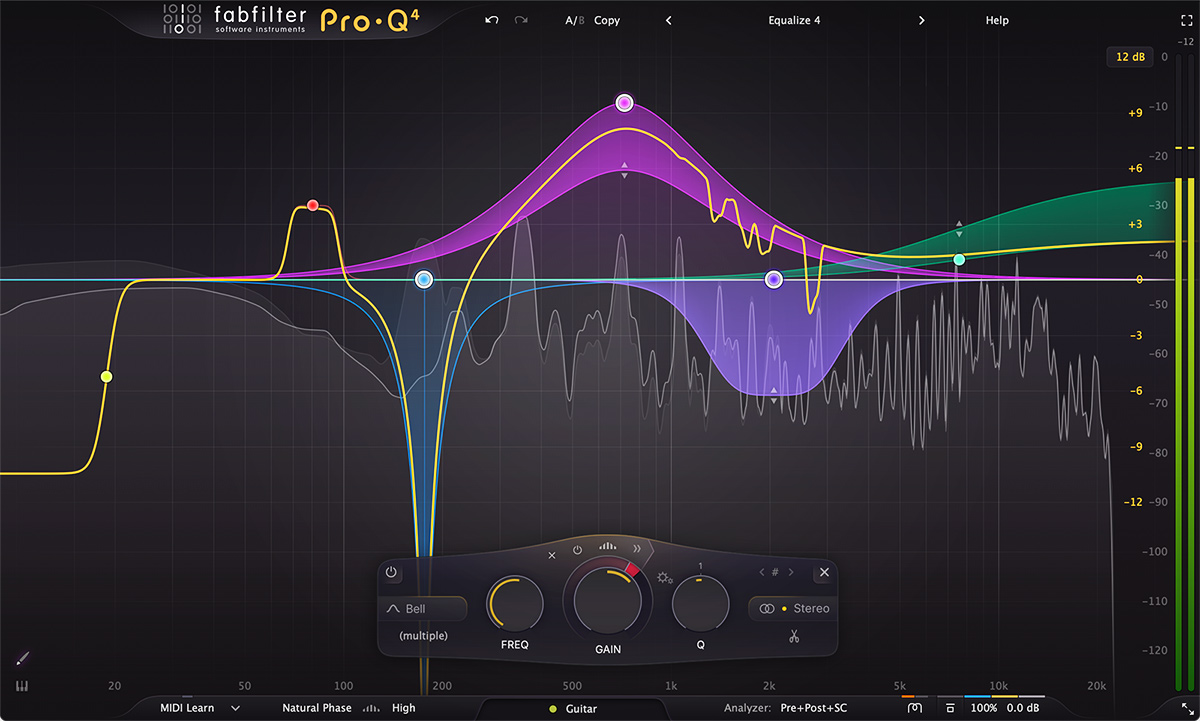
The best EQ plugin ever made — FabFilter Pro-Q 4 delivers spectral dynamics, EQ Sketch, 24 bands, and surgical precision that justifies every penny of its price tag.
Producer Hub checks manufacturer specs, UK pricing, DAW compatibility and real bedroom-studio use cases before recommending gear. Ratings are editorial scores, not paid placement. Affiliate links may earn a commission at no extra cost to you.
| Type | Linear phase & minimum phase EQ |
| Bands | Up to 24 EQ bands |
| Spectral Dynamics | Yes — frequency-specific dynamics |
| EQ Sketch | Yes — draw EQ curves naturally |
| Sidechain | Yes |
| Stereo Modes | Stereo, M/S, Left/Right, Mid, Side |
| Formats | VST3, AU, AAX, CLAP |
Pro-Q 4 adds Spectral Dynamics — the ability to apply dynamic EQ across the entire frequency spectrum simultaneously. Rather than broadband compression, you attenuate only the specific frequencies that are too loud, only when they are too loud. A dramatically more surgical approach that produces more transparent, natural-sounding results.
Draw the EQ curve you want using your mouse, and Pro-Q 4 automatically creates the appropriate combination of bands to approximate your sketch. It's intuitive, fast, and removes the technical barrier between creative vision and EQ settings. Particularly useful for corrective EQ on complex signals.
FabFilter's EQ algorithms are among the most transparent available. In minimum-phase mode, the Pro-Q 4 sounds essentially inaudible — applying only the intended EQ change without sonic side effects. For mastering and critical mixing, this transparency is essential.
FabFilter Pro-Q 4 is for serious producers and mixing engineers who already know basic EQ and want faster problem solving. Whether you are doing corrective EQ on a vocal, dynamic control on harsh samples or tone shaping on synths, Pro-Q 4 handles the job with precision.
Pro-Q 4 is best for producers who already understand basic EQ moves and want a faster, clearer way to solve mix problems. It suits mixing engineers, advanced bedroom producers, vocal editors, mastering chains and anyone who needs surgical correction without losing musical feel.
The reason Pro-Q keeps showing up in serious sessions is speed. You can find harshness, carve space, clean low-end, match problem areas and make dynamic moves without feeling like the interface is fighting you. That matters when a mix needs dozens of small decisions instead of one dramatic fix.
Do not buy it because you think an expensive EQ will fix weak arrangement or poor sound selection. Ableton EQ Eight, FL Studio Parametric EQ 2 and many stock EQs are already capable of excellent mixes. Pro-Q becomes worth it when speed, visual feedback, dynamic EQ and workflow polish save real time.
If Pro-Q 4 becomes your main EQ, the next smart move is learning when not to EQ. Use it for problems that matter: low-end cleanup, harsh resonances, masking and dynamic control. The plugin is powerful enough that restraint becomes part of the skill.
The FabFilter Pro-Q 4 is the standard against which every other EQ plugin is measured. Spectral Dynamics, EQ Sketch, 24 bands, and transparent processing make it the most powerful and versatile EQ available. The price is justified by the quality. If you are serious about mixing, the Pro-Q 4 is not optional.