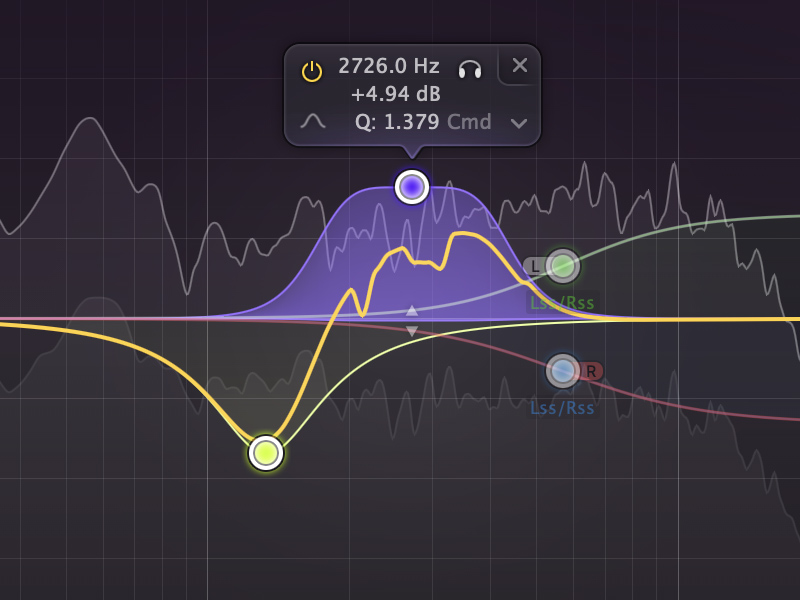
FabFilter's Pro-Q series has been the default EQ plugin recommendation in professional music production circles for over a decade. Pro-Q 2 was the plugin that made producers realise software EQs could sound genuinely great. Pro-Q 3 added mid/side capability and dynamic EQ bands that changed how we think about frequency management. Now Pro-Q 4 is here, and the obvious question is: has FabFilter managed to improve on something that was already near-perfect?
I've been using Pro-Q 4 across around 30 productions since it launched — everything from club-focused techno to commercial pop, plus a fair bit of mixing and mastering work. Here's what I actually think about it.
What's New in Pro-Q 4
FabFilter hasn't reinvented the wheel here — they've refined it significantly. The major additions in version 4 are:
- Spectral Dynamics: A completely new type of EQ processing that analyses the spectrum over time and applies dynamic corrections based on what's happening in the audio — not just at what frequency, but when and how much.
- Intelligent Band Soloing: When you solo a band (Alt+click on a node), Pro-Q now gives you a smarter preview that's easier to use as a surgical diagnostic tool.
- Improved Spectrum Analyser: Higher resolution, better peak hold, and improved collision detection with other instances of Pro-Q.
- Brickwall Filters: Very steep slope filter options (up to 96dB/oct) now available as a dedicated mode.
- Updated M/S and Stereo Modes: The mid/side workflow has been refined and extended.
Spectral Dynamics: The Real Star of the Show
Let me spend a bit of time on Spectral Dynamics because it's genuinely new territory for an EQ plugin, and it's what makes Pro-Q 4 a meaningful upgrade over Pro-Q 3 rather than just a polish release.
Traditional dynamic EQ works like this: you place a band, set a frequency, and tell the EQ to only engage when the signal at that frequency crosses a threshold. Useful, but somewhat blunt. Spectral Dynamics works across the full frequency spectrum simultaneously — it's more like having a multiband transparent compressor that acts entirely within the EQ framework.
How I'm Using It in Practice
The most immediate use case I've found is on vocal tracks with sibilance problems. Rather than reaching for a de-esser (which is essentially a one-trick spectral dynamic processor), I'm pulling up Pro-Q 4, enabling Spectral Dynamics mode, and letting it identify the problematic high-frequency buildup on the sibilants automatically. The result is more natural-sounding than most dedicated de-essers because the processing is frequency-specific and adapts to the material.
For drum buses, the Spectral Dynamics mode does something magical for controlling harsh transients in the upper midrange (the annoying 3-5kHz range that gets fatiguing over time) without touching the body of the drums. It's like having a frequency-aware limiter that only acts where you need it.
On a full mix bus, I've started using a gentle Spectral Dynamics pass as part of my mastering chain — very low amount, just to even out any frequency imbalances that compression and limiting have emphasised. It's not a replacement for proper mix decisions, but as a final polish tool it's superb.
The EQ Itself: Still Best in Class
Away from the shiny new features, let's talk about what Pro-Q has always been: a supremely good-sounding EQ with an exceptional workflow. Version 4 doesn't mess with either of these fundamentals.
Sound Quality
FabFilter's EQ algorithms are as transparent as anything you'll find in software — zero-latency mode is genuinely phase-perfect, and even the linear phase mode (which introduces latency in exchange for perfectly linear phase response) remains extremely musical rather than the sterile, slightly unsatisfying sound that some linear phase EQs produce. In Natural Phase mode — the default for most mixing use — the result is an EQ that colours the sound in a subtly pleasing way while remaining completely controllable.
Head-to-head comparisons with hardware EQs on drum buses and instrument buses show Pro-Q holding up beautifully. It's not trying to emulate anything analogue — it's just trying to be the cleanest, most accurate EQ possible, and it succeeds.
The Interface
FabFilter's GUI has always been the benchmark for plugin design, and Pro-Q 4 continues that tradition. The real-time spectrum analyser is gorgeous and genuinely useful — not just eye candy. The ability to grab any point in the spectrum and have a band instantly created there makes working with Pro-Q incredibly fast. The piano roll keyboard along the bottom (showing which frequencies correspond to which notes) is underrated for musical EQ decisions — being able to see that you're boosting around G2 rather than just "100Hz" changes how you think about what you're doing.
Is It Worth Upgrading from Pro-Q 3?
If you own Pro-Q 3, this is the question. My honest answer: it depends on your work.
If you're primarily a beat maker or EDM producer who uses EQ for basic mixing tasks — high-passing, carving frequency space, the occasional creative boost — Pro-Q 3 still does all of that perfectly. The upgrade is not urgent.
If you mix vocals, work on full productions, or do any mastering, Spectral Dynamics alone is worth the upgrade price. It's genuinely useful on almost every session and does things no other tool does in quite the same way.
FabFilter pricing has always been fair for the quality. Check their site directly for current upgrade pricing from Pro-Q 3 — they typically offer significant discounts for existing users.
The Verdict
Our Verdict
FabFilter Pro-Q 4 is the best software EQ available in 2026. The Spectral Dynamics feature is genuinely innovative and immediately useful, the sound quality remains peerless, and the interface is still the gold standard for plugin design. For anyone who doesn't own Pro-Q 3, it's an essential purchase. For Pro-Q 3 owners — worth it if you work on vocals or do any mastering work.
Pros
- Best-in-class sound transparency and accuracy
- Spectral Dynamics is a genuinely new and useful feature
- Interface remains the benchmark for plugin UX design
- Excellent M/S and per-channel processing
- Brickwall filter modes for surgical clean-up
- Works brilliantly as a dynamic EQ and de-esser
Cons
- Expensive if you're buying fresh (though worth it)
- Spectral Dynamics has a learning curve — easy to misuse
- CPU usage is higher than Pro-Q 3, noticeable on large sessions
- No analogue character — if you want colour, you need something else
Want More Plugin Reviews?
We test and review the tools producers actually use. Check out more honest reviews in the blog.